
I was posting on social media years ago, and I felt like I was running on a hamster wheel. You know that feeling when you create something, and 24 hours later, it’s already buried, and nobody sees it anymore?
I was exhausted.
I needed a platform that worked for me, not the other way around.
Then I heard about Pinterest and how your pins can drive traffic for months or even years after you publish them. That’s when I knew this was MY platform.
The one where I could actually sell digital products on Pinterest without burning out from the constant content treadmill.
But here’s the thing.
Pinterest is a long-term game, and you’ll need to be patient. When this machine starts working, though, it really works great.
In 2025, I got 252,583 blog visitors, and the more traffic I got, the more sales I made.
I also noticed something that completely changed my sales. I’m sharing that in the next section because it’s honestly the mostimportant thing you’ll read in this whole post.
This post contains affiliate links (including Amazon Associate links). If you make a purchase through these links, I may earn a small commission at no extra cost to you. As an Amazon Associate, I earn from qualifying purchases. Please read full disclosure for more information. I also use AI to help me write, but I tell it exactly what to say based on my results and experiences.
Why I Finally Decided Pinterest Was Worth My Time
Look, I’m not going to lie to you. I was skeptical about Pinterest at first.
I thought it was just a place where people saved recipes they’d never cook and business plans they’d never use.
But then I started seeing real numbers from real people, and everything shifted.
The Numbers That Changed My Mind About Pinterest
Seeing other people getting 10k, 20k, and even 100k clicks made me see the potential of this platform.
And these people were showing how pins they’d created years ago were still getting them traffic today.
I was sold instantly lol.
The idea that something I create today could still bring me visitors and sales in 3 years? That’s the kind of business model I wanted.
Not the social media hustle where you have to post 5 times a day just to stay visible.
I wanted to work smarter, not harder.
Who’s Actually Buying on Pinterest (Hint: It’s Not Who You Think)
With over 600 million active monthly users, the chance for your business to grow is huge.
People who use Pinterest are action takers, and that’s what makes them so different from other social media. They’re not just scrolling to kill time or see what their friends ate for lunch lol.
They’re actively planning their next project, their next purchase, their next life upgrade.
77% of Pinterest users say the platform helps them make purchase decisions. Think about that for a second. They’re literally on Pinterest to BUY things, to find solutions, to take action.
This means your digital products aren’t interrupting their day. You’re giving them exactly what they came looking for.
And get this: they’re mostly women with buying power. They’re planning weddings, decorating homes, starting businesses, raising kids, looking for self-care solutions, and more.
If your digital product solves a problem for any of these groups, you’re in the right place. But you can see here which niches are popular on Pinterest.
Join other action takers and get the plan to see how these phases work together, so your hard work finally pays off.
The One Thing You Need to Understand Before You Sell Anything
Pinterest traffic is cold traffic. And you might be wondering, “But Petra, what does that even mean?”
It means that people don’t know you, so they don’t trust you.
So if you send them directly to your digital product page, they might not buy. That doesn’t mean no one will buy, but there’s a better way to increase your profits.
It might sound scary, but blogging is where you’ll make more money. Wait, don’t close this tab yet.
You don’t need to write in a super professional way. Just look at my blog posts. I write in a casual, conversational way, like we’re talking.
You see, when you share some helpful tips, those people will trust you more. So they’re more likely to buy.
And if they don’t buy instantly, you could get them on your email list to keep in touch and build that trust even more.
Why Pinterest Traffic Feels So Different (And What That Means for Your Sales)
When someone finds you on Instagram or Facebook, they already follow you or they’ve seen your content before. There’s some familiarity there, even if it’s small.
Pinterest users found you through a search.
They were looking for a specific solution, typed in some keywords, and your pin showed up. That’s it. They have zero clue who you are.
This is why sending them straight to a sales page usually doesn’t work. They need to warm up to you first.
They need to see that you actually know what you’re talking about. That you’ve been where they are and you found a way through.
A good blog post does exactly that. It shows your expertise, your personality, and it builds trust fast.
The Blog Post Strategy That Actually Converts Cold Browsers
I started writing blog posts that shared my journey, mistakes, and how I fixed them. I try to make every post feel like a conversation.
It doesn’t need to be professional, and let’s be honest, most people don’t like to read if there’s a lot of dry information and nothing else.
Then I also recommend tools and products that are the next logical step for action takers. People who want to save time and are serious about getting bigger and better results.
And I’m not even hardcore selling.
What works way better is if you just recommend the products that are the next smart step for your audience who’s done playing small and who wants results. You don’t need to complicate it.
Just share what helped you and how it helped you. Simple, isn’t it?
Your blog post becomes the bridge between a stranger on Pinterest and a happy customer who trusts you. That’s the whole game right there.
Setting Up Your Pinterest Account to Sell Digital Products on Pinterest (Without Getting It Shut Down)
First, I recommend creating a Pinterest business account, so you get analytics. Without them, you’ll be mostly winging it, and that never results in success.
Take the analytics seriously, and here’s why…
At first, I didn’t, and I regret that. I was just trying things and didn’t know what was working. I wasted a ton of time and energy.
Don’t be like me lol. Now moving on to the next important part.
I’ve heard many people who said they lost their new Pinterest accounts because they did the entire setup process in one day. I suggest you do it sloooooowly.
Do one task today (create the business account), tomorrow fill out your name with keywords, on day 3 create a bio, and so on. This way, Pinterest sees you as a real human, not a spammy bot.
If you want to dive deeper into optimizing your whole Pinterest presence, I wrote a full guide here: Pinterest SEO: How To Optimize Pinterest To Get More Traffic.
Day 1: Create Your Business Account
Go to Pinterest and sign up for a business account. If you already have a personal account, you can convert it to a business account in your settings.
Then fill out the basics: your business name, and claim your website URL if you have one (you can add it later if you don’t).
Then stop. That’s it for today.
I know it feels like you should do more, but trust me on this. Slow and steady wins the race on Pinterest.
Day 2-3: Keyword Research And Fill Out Your Profile Name and Bio
Keywords are the most essential part of Pinterest. If you don’t use them, you won’t get any reach, and no one will click to read your blog or buy your digital products.
You should find the exact words your customers are typing in, and you want to be found for.
There are a few ways to do this. Let’s start with the free option.
You can start by typing a word related to your niche into the Pinterest search bar. Watch the phrases that show up in the drop-down menu.
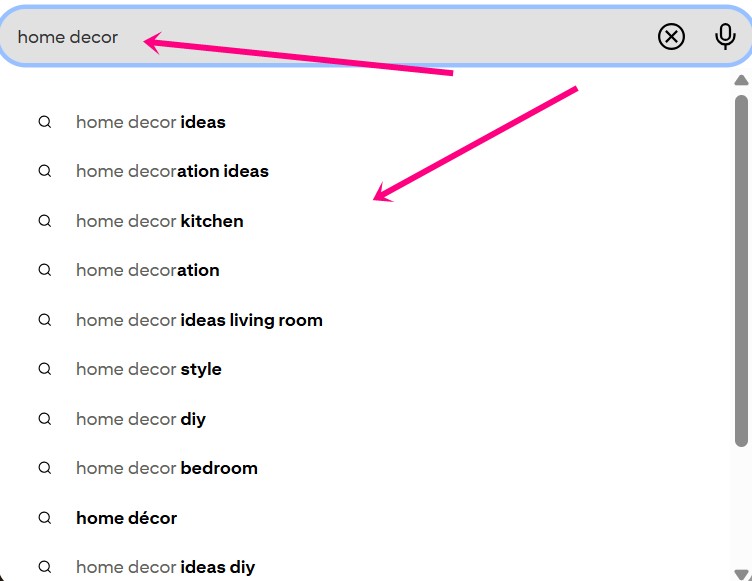
Those are the exact phrases people are searching for right now. So do your research and make a list.
I’ve written a full guide about finding Pinterest keywords here.
But if you want to find the best keywords, you need better data. I always use a tool called Pin Inspector to help me win.
It is amazing because it shows you how many monthly searches specific keywords have.
This tool saves you hours of guessing.
Once you have your list of keywords, you can add them to your profile name and Bio. It will help your account show up when people search for those phrases.
Day 4-5: Building Your First Boards the Right Way
At the beginning of using Pinterest for business, I did an okay-ish keyword research, but my boards were not optimized in the best way because of that. So I had to delete some boards and create new ones.
Don’t make the same mistake I did.
Your board names need to match what people are actually searching for. Not cute, creative names that sound fun, but nobody types them into the search bar.
Create 1-2 boards to start. Each board should focus on one topic in your niche, and the board name should include your main keyword for that topic.
For example, if you sell meal planning templates, you might create boards like “Weekly Meal Planning Ideas,” “Meal Prep for Beginners,” and “Healthy Family Dinner Recipes.” See how those are all search-friendly?
I made another blog post that breaks this down even more: Your Ultimate Guide to Crafting Perfect Pinterest Board Names. Check it out if you want to get this part right the first time.
Also, add a description to each board using more keywords. But don’t stuff them in like it’s a Thanksgiving turkey lol. Make the descriptions sound natural.
Then save a few pins to each board (you can save other people’s pins at first, that’s totally fine). Just make sure the topics of the pins match the title of your board.
Day 6-7: Creating Your First Pins That People Will Actually Click
This is the most time-consuming part of Pinterest, but it’s also where you’ll see the magic happen. Your pins are what bring people to your blog and eventually to your digital products.
You need eye-catching designs with clear text overlays that tell people exactly what they’ll get when they click.
I’m not a designer, and you don’t need to be either. AI tools can create your pins fast.
I actually wrote a whole post on the AI tools that will help you create stunning Pinterest pins. These tools save me hours and make my pins look professional without hiring a designer.
Once you’ve created your pins, write keyword-rich titles and descriptions (without keyword stuffing, because that’s annoying), and schedule them to go out over time. Don’t post everything at once!
I made another guide on How I Create Pins on Pinterest Quickly and Schedule for 14 Days. It walks you through my exact process so you’re not spending hours on this every single day.
Anyway, after these 7 days, your account is set up properly, and you’re ready to start driving traffic. But don’t post 100 pins in a day. Start with 1 or 2 per day.
Now you just need to stay consistent and keep creating content.
Digital products to sell on Pinterest for the top niches
Not every niche works the same way on this platform for sales. Some do much better than others.
I wrote a post about Popular Niches on Pinterest That Are Dominating Right Now. You should check it out to see which niches are doing great.
Now, let me give you some digital product ideas for the biggest industries.
Digital product ideas for Home Decor
People on Pinterest are obsessed with making their homes beautiful, and they’re willing to pay for shortcuts.
Think checklists, templates, and guides that help them decorate without hiring an expensive designer.
- Printable wall art sets for a living room
- Home renovation budget planners for big projects
- Color palette guide books for a small bedroom
- Small space organizing checklists for a tiny home
- Kitchen decluttering digital labels for pantry jars
- DIY furniture projects for beginners
- Seasonal decorating e-book for a cozy holiday home
Digital product ideas for Parenting and Family
Parents are always searching for solutions to make their lives easier.
They’re tired, overwhelmed, and looking for anything that saves them time or helps their kids thrive.
- Potty training reward charts for your little ones
- Weekly meal plan templates for a busy family
- Kids’ activity pack printables for rainy days
- Chore charts for toddlers to help at home
- Homeschooling daily schedule logs for your school days
- Pregnancy digital journal for first-time moms
- Baby shower game printables for your best friend
Digital product ideas for Health and Fitness
People searching for health and fitness content on Pinterest are motivated and ready to take action.
They want plans, trackers, and guides that help them reach their goals faster.
- 30-day yoga challenge logs for your body
- Macro tracking digital spreadsheets for your daily food
- Home workout plan e-book for a busy life
- Healthy smoothie recipes PDF for your morning drink
- Weight loss journey trackers for your fitness goals
- Mental health daily journals for your busy mind
- Gluten-free grocery list printables for your store trips
Digital product ideas for DIY and Crafts
DIY and crafts are one of the most popular niches on Pinterest, and people in this space love buying templates, patterns, and step-by-step guides.
They want to create beautiful things without starting from scratch.
- Crochet pattern digital files for a yarn hobby
- Cricut vinyl cutting designs for your craft room
- Hand lettering practice sheets for your pretty writing
- Sewing pattern PDF downloads for your next dress
- Jewelry-making video tutorials for your new hobby
- DIY soap-making recipes for your gift baskets
- Holiday craft project e-books for your family fun
Digital product ideas for Business and Entrepreneurship
Entrepreneurs are looking for ways to streamline their businesses, and they’re willing to pay for templates and guides that save them time.
- Social media caption templates for your daily posts
- Pinterest pin Canva templates for your new pins
- Business budget tracking sheets for your monthly money
- Email marketing subject line lists for higher open rates
- Digital product launch checklists for your new offer
- Brand board design templates for your business look
- Client onboarding form PDFs for your new workers
Digital product ideas for Personal Development
Personal development seekers are always investing in themselves.
They’re looking for tools, templates, and guides that help them grow, set goals, and become the best version of themselves.
- Daily gratitude digital journals for your happy life
- Manifestation goal-setting planners for your big dreams
- Confidence-building daily prompts for your inner soul
- Time management digital workbooks for your busy days
- Meditation habit tracking sheets for your quiet time
- Vision board digital clip art for your dreams
- Positive affirmation card printables for your daily mood
Digital product ideas for Food and Recipes
Food is one of the biggest categories on Pinterest, and people are always searching for new recipes, meal plans, and cooking shortcuts.
If you love cooking, not just eating lol, this niche is perfect for selling digital products.
- Keto diet recipe e-books for your healthy life
- Air fryer cooking charts for your quick meals
- Holiday dinner party planners for your big guests
- Vegan baking substitute guides for your sweet treats
- Meal prep freezer labels for your busy week
- Instant pot recipe cards for your easy dinner
- 5 ingredient meal templates for your quick cooking
Digital product ideas for Gardening
- Garden planting zone maps for your backyard plants
- Seed starting tracking logs for your spring garden
- Herb garden indoor guides for your kitchen window
- Pest control natural recipe sheets for your bugs
- Landscape design planner pages for your dream yard
- Vegetable harvest digital journals for your garden food
- Composting for beginners e-book for your rich soil
Wrapping It Up
Selling your offers doesn’t have to feel like a heavy or messy job. When you sell digital products on Pinterest, you build a real asset for your future.
Just remember to take it slow when you set up your new account.
If you want to build this properly, without the daily content grind, grab my Prompt-to-Profit System™.
In just 7 days, you will use my step-by-step process and prompt chains to finish your digital product and set up your Pinterest plan to sell it. Get instant access here.

 Petra is a full-time blogger and CEO of Big Income Paradise. She teaches digital creators how to get more Pinterest traffic, generate leads, create better content & digital products, and make money online with the help of AI.
