
Want to get more eyes on your content without dancing on TikTok?
You need to master Pinterest keywords.
My guide is going to show you exactly how to find them. I’ll talk about the best Pinterest keyword tool, simple tricks, and how to use the right words to get more visibility.
Whether you’re a creator or a business owner, this is how you win at Pinterest marketing.
Let’s get into it.
This post includes affiliate links to products I love and recommend, meaning I may receive a small commission at no extra cost to you. Please read full disclosure for more information.
Why Keywords on Pinterest Are a Big Deal
Pinterest isn’t really social media. It’s a search engine, just like Google, but with pictures.
I remember back when I started, I tried to grow on Facebook. It was exhausting. I was posting all the time, but my posts disappeared after 24 hours. It felt like spinning tires in mud.
Then I realized something huge.
Pinterest marketing is different. Your content lasts for months or even years. But only if you use the right keywords for Pinterest.
Keywords are just the words people type into the search engine. If you use the right ones, people find you. If you don’t, you’re invisible.
It’s that simple.
Using the right Pinterest keywords helps the algorithm know what your pin is about. This means your content shows up when people are actually looking for it.
You need to add keywords to your:
- Pinterest account name
- Pinterest profile bio
- Pinterest boards
- Pin descriptions
- Pin titles
- Title on the image
- Image files
When you do this right, you get more engagement and traffic.
If you want to go deeper and learn more, then read my blog post: How To Use Pinterest For Business.
How Pinterest SEO Actually Works
Pinterest SEO stands for Search Engine Optimization. It sounds fancy, but it just means “making it easy for the algorithm to understand your pins and showing them to people who would be interested.”
To have a good Pinterest SEO strategy, you need to think like your audience.
When someone types something into the Pinterest keywords search bar, Pinterest looks through all the pins to find the best match.
It looks at the keywords you used and how good your content is.
If you want to rank high, you need to find the terms your audience is typing in. Then, you put those words in your Pinterest description, title, and boards naturally.
Don’t just list a bunch of words like a robot. That’s called keyword stuffing, and Pinterest hates it. It can actually hurt your reach, or you could even lose your account.
Simple Tools to Find the Best Keywords
You don’t need to be a tech wizard to do Pinterest keyword research. There are easy tools you can use right now.
1. The Pinterest Search Bar
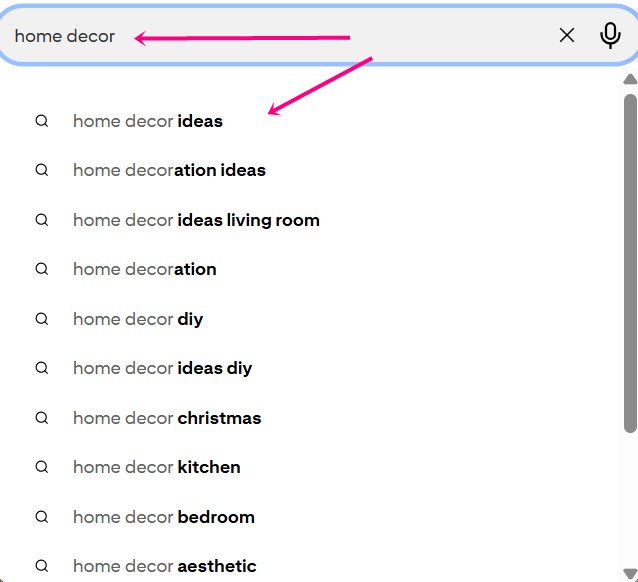
This is the best free Pinterest keyword tool. Just start typing a word related to your niche. Pinterest will show you a list of words that finish your sentence. These are the best keywords for Pinterest because people are actually searching for them right now.
2. Pinterest Trends
This tool shows you what’s popular. You can see if a topic is trending upwards or downwards. Pinterest Trends help you find topics that will get you more visibility if you post the pins at the right time.
3. Pinterest Keyword Tool Options
If you want to dig deeper, you can use a Pinterest keyword research tool like PinInspector or others. I use PinInspector because it saves me a lot of time.
But if you’re on a tight budget, the search bar and Trends tool are all you need. The only downside is, you won’t see the number of monthly searches, and you’ll spend a lot of time searching for the right keywords.
And when you find the right phrases people search for, add them to your Pinterest keywords list, so you’ll have everything in one place.

How to Do Pinterest Keyword Research the Right Way
Okay, so how to do Pinterest keyword research without losing your mind?
1.) Start with your main topic and type it into the search bar.
2.) Look at the suggestions in the drop-down menu. These are some of the keywords you can use.
3.) Then try to find long-tail keywords. These are longer, specific phrases.
- Short-tail keyword: “Recipes.”
- Long-tail keyword: “Easy healthy vegan dinner recipes”
Use more of the long ones because they have less competition.
This is the core of keyword research for Pinterest. Basically, you’re looking for specific problems you can solve.
You might also love this: How to Make Money on Pinterest for Beginners
Where to Put Your Keywords
You found your list of keywords. Now what?
Now you need to put them in your pins.
1. Pin Title
First, create a catchy Pinterest pin title that will make people want to click and learn more. Make sure you use your main keyword in the title.
2. Pin Description
Write a catchy pin description that tells people what your pin is about. Use your Pinterest keywords naturally. A good description makes people want to click.
Want to speed up your Pinterest creation? Then you’ll love to grab these 10 Unique ChatGPT Prompts For Pinterest Marketing.
3. Pinterest Boards
Give your Pinterest boards clear names. For example, “Yummy Food” is a bad title. But “Gluten Free Dessert Recipes” is good. Add keywords to the board descriptions too.
4. Pinterest Profile
Your Pinterest profile should tell people exactly what you do, who you help, and how. Use the Pinterest SEO terms you want to be found for in your name and bio.
Also, make sure you claim your website.
5. Pin Images
You should also use the keywords on your pin images because Pinterest scans them. Also, make sure that any image you put on the pin is related to the topic. Let me explain…
If you’re making a pin about boho living room decor, and you put an image of a laptop, you’ll confuse Pinterest, and it won’t help you rank that well. So make sure everything is relevant to the subject.
And hey, if you’re someone who wants to save time, then you’ll love to read my other blog post: 3 AI Tools I Use to Create Stunning Pinterest Pins in Seconds
Wrapping It Up
Finding the right Pinterest keywords is the secret sauce to growing your visibility.
It helps you show up in the search engine, get more followers, and drive traffic to your business.
Remember:
- Use the search bar as your Pinterest keyword tool.
- Focus on specific keywords that fit your content.
- Don’t be a robot – avoid keyword stuffing.
- Check Pinterest trends often.
Most importantly, don’t try to be perfect. Perfectionism is like trimming grass with tweezers – it will waste your time.
Just start taking imperfect action with your Pinterest marketing strategy. That is the only way you will ever see real results.
 Petra Šranc (CEO of Big Income Paradise) is passionate about teaching female entrepreneurs how to do Social Media Marketing to grow their business online. She also focuses on teaching Social Media content tactics to skyrocket traffic, leads, and sales.
