
For a long time, I thought a beautiful design was enough to sell a digital product.
I’d spend hours picking the perfect color palette, tweaking fonts, and obsessing over little details in Canva. But my sales were at a big fat ZERO.
So I’d go back and make the design even better. Still nothing.
Turns out, the problem was never the design. My products looked great, but didn’t CLEARLY solve a problem.
Nobody could figure out what they were buying or why they needed it, and I had no idea that was happening.
That one mistake cost me months of wasted effort.
In this post, I’m going to walk you through how to make money with Canva and ChatGPT by building one simple PDF that actually sells.
This post includes affiliate links to products I love and recommend, meaning I may receive a small commission at no extra cost to you. Please read full disclosure for more information.
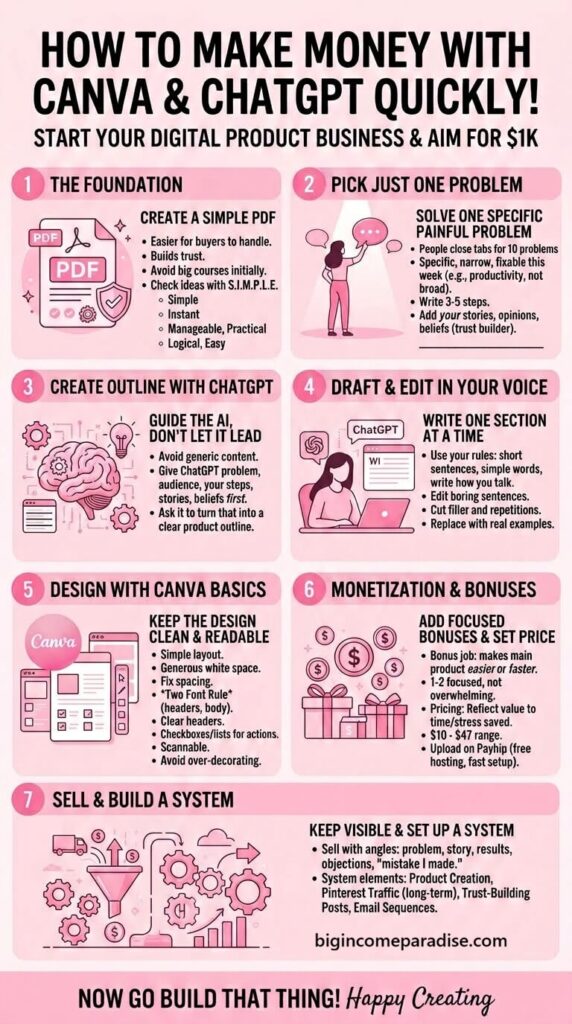
How To Use Canva And ChatGPT To Make Money With a Simple PDF
Why a Simple PDF Gets Sales Faster Than Anything Else
A PDF is small enough for a buyer to actually open and use. That matters more than you think.
When someone sees a PDF, their brain thinks, “I can handle this.”
But when they see a big course, they might think, “I’ll get to that next week.” And we both know what that usually means – it means NEVER.
Why I Don’t Recommend You To Build a Course Today
I spent a long time building big digital products because I thought that was the real way to make money.
Months of work, a huge launch, and then…a few sales trickled in. But for all that hard work, it didn’t feel worth it.
It hurt more than I expected the first time. And the second time.
To be honest with you, I repeated that mistake 4 or 5 times before I finally believed it was actually a mistake.
Here’s the thing I eventually learned, and it works better and faster.
A small product doesn’t just make you money faster. It proves to your buyer that you can help them.
When someone buys your $17 PDF, and it solves their problem, they trust you.
That trust is what sells the bigger, more expensive thing you’ll build next.
Start with a simple PDF. Then you’ll see what other problems your buyers will experience. And that’s when you can build a course or a tool.
Check Your Product Idea Against My S.I.M.P.L.E. Method
Before you build anything, run your digital product ideas through this checklist. I use it every single time.
- S – Simple: Does it solve one clear problem? If you can’t describe what the product does in one sentence, it’s too broad.
- I – Instant: Can the buyer see progress in the first few hours or days? If they have to wait months before anything useful happens, you’ll lose them.
- M – Manageable: Can they finish it without feeling overwhelmed? The easier it feels to complete, the more likely they are to buy it.
- P – Practical: Does every part of the product help them do something?
- L – Logical: Does it flow naturally from one step to the next? If a buyer has to flip back and forth to figure out what they’re supposed to do, you’ll have to fix the structure.
- E – Easy: Easy for you to build, and easy for them to follow.
Run your idea through those 6 checks before you even open Canva. If something doesn’t work, fix it now, not after you’ve spent 3 days designing your product.
Pick Just One Problem To Solve
One clear problem makes a buyer say yes fast. 10 different problems make them close the tab and forget you exist.
I had a product that was selling really well. So I decided to make it even better by adding more to it.
More sections, more bonuses, more value. I genuinely thought people would love it.
Then the shock happened…
Sales dropped every single month after that update.
I couldn’t figure out why, until a woman sent me an email saying she loved the product, but there was just SO MUCH in it.
That hit me hard. I made the product overwhelming without realizing it.
The extra content didn’t feel like value to her. It felt like homework.
I still repeated that mistake a couple more times, just to be absolutely sure it was a mistake hehe.
Pick a Problem They Want Fixed This Week
The right problem is something your buyer is thinking about right now. Not in some abstract “someday I’d like to fix this” way.
It’s specific enough that they recognize it immediately when they see your product.
It’s painful enough that they’d actually pay to make it go away.
And it’s small enough that a PDF can genuinely help.
If your problem sounds like a category – “productivity,” “mental health,” “social media” – it’s too broad.
Narrow it until it feels almost uncomfortably specific. That’s usually the right spot.
Here’s the Example Problem I’ll Use for This Post
To make the rest of this post concrete, I want to walk you through a real example instead of just describing things in theory.
I recently lost my dog, Ciara. It’s been one of the hardest things I’ve dealt with in 2026, and the grief hits at the strangest moments.
What I noticed is that when you lose a pet, there’s almost no practical guidance.
There’s a lot of “I’m so sorry” and very little “here’s what to actually do with yourself right now.”
That’s a real, specific, painful problem. And it’s the kind of thing a focused PDF could genuinely help with.
So throughout this post, the example product I’ll keep coming back to is a PDF called something like “How to Cope After Losing Your Dog.”
People who are in that specific grief, right now, would search for this.
They don’t want a 12-week course. They want something they can open today and actually use.
But obviously, your digital products will be in your own niche with your own problem.
Now lets follow this example, and you’ll see the whole process in action.
Write 3-5 Steps That Solve the Problem
To make it simple, you should keep it up to 5 steps max. Each step does one job.
If your reader needs a roadmap just to follow a single step, simplify it.
Here’s how the 5 steps could look for the dog grief PDF:
- Step one is writing down one specific favorite memory with your dog. Just one. That single act can interrupt the emotional rollercoaster that grief creates and give you something real to hold onto.
- Step two is creating a small goodbye ritual. A candle, a favorite photo, a walk to the park they loved. Something that gives grief a moment to exist rather than just sitting inside you with nowhere to go.
- Step three is mapping out where your daily routine now has a gap. Dogs structure our days without us realizing it. For example, the morning walk, the feeding schedule, and the way they greeted you when you got home. Naming the gap is the first step toward filling it with something that actually helps.
- Step four is finding one person or a community who understands pet loss. Grief gets heavier when it has nowhere to go.
- Step five is a short weekly check-in with yourself. 5 minutes to notice how you’re feeling compared to last week.
Ugh, this was hard to write. I might have cried a little bit…okay, moving on.
Add Your Stories, Opinions, and Beliefs to Each Step
Anyone can write 5 steps. What nobody else can copy is your specific experience, your opinion, and the exact way you explain things.
For the dog grief example, the step 3 about mapping your routine gap? I can speak to that from real experience.
Every day at 10 am, I went to the kitchen to make breakfast.
And Ciara would follow me. She hoped I would give her some food.
When she was gone, I genuinely didn’t know what to do with 10 AM anymore.
That one detail makes the step 3 feel real to a reader going through the same thing.
Your story does the same thing for your buyer. They read your words and think, “This person actually understands what this is like.”
That’s when you build trust. That’s what gets them to come back and buy from you again.
You’ll also love: Transformational Storytelling For Brands That Want To Build Trust
One Story Per Step Is Enough
One short story per step does the job. 2-4 sentences are usually all you need.
Just enough to make the lesson feel like it came from your real life experience and not from Google.
Your opinion belongs in here, too. If you think a certain approach works really well, say it.
If you think something most people do is a waste of time, say that too.
Readers want to know what you think, not what is already out there on the internet.
Now Open ChatGPT and Ask It to Build Your Product Outline
Here’s the part most people get wrong with ChatGPT, and I was one of them for some time.
I used to open ChatGPT and just ask it to write me a PDF. I thought since it’s an AI, it would just know what I needed.
I had a big imposter syndrome problem at the time.
I kept thinking, “ChatGPT has access to more information than I do, so I should let it lead.”
Worst mistake I ever made!
The product it gave me was generic, boring, and could have been written by anyone.
Because basically, it was.
ChatGPT didn’t have my stories or my experience.
It just pulled whatever exists on the internet, and anyone could find the same thing on Google for free.
What you should do instead is this…
Give ChatGPT everything first:
- your problem,
- your target audience,
- your 5 steps,
- your stories, your opinions, and beliefs.
- Then ask it to turn all of that into a clear product outline.
What You Ask ChatGPT to Create
Tell it to keep your order exactly as you wrote it. Share your stories as examples inside each step, and instruct it NOT to invent new examples.
When ChatGPT has your information to work with, the outline will help you build a product that’s personal and relatable.
But building a digital product outline is just the start. Once it’s done, you still need to create the offer, get traffic to find buyers, content to stay visible, and emails to close sales consistently.
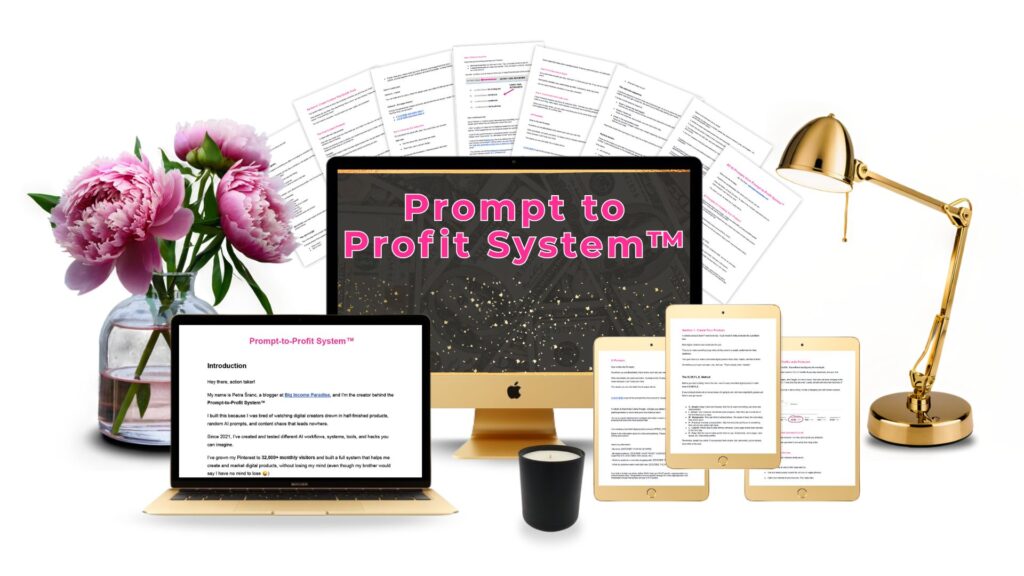
If you want a workflow that handles all that, then the Prompt-to-Profit System is exactly what you need.
Tell ChatGPT to Write the Product in Your Voice
Before ChatGPT writes anything, give it your rules and guide it.
Tell it to use:
- Short sentences and simple words
- Write the way you talk
- Pull your stories in as examples, not invent new ones.
- If there are words you hate, list them and tell it to avoid them.
I used to get drafts full of weird-sounding AI words every single time. I had to do heavy-editing and it wasted so much of my time.
Eventually, I started telling ChatGPT what I wanted, and it got better (not perfect).
Write One Section at a Time With ChatGPT
Write one section at a time, not the whole product in one go.
One section keeps the draft clean and keeps you in control of what’s happening before you move on.
When you tell ChatGPT to create the whole PDF, the output gets vague and much harder to edit.
Edit the Draft ChatGPT Gives You
The draft is a starting point. ChatGPT might give you sentences that sound smart but are 1000% boring.
The test I use is simple: if I wouldn’t say it out loud to someone sitting across from me, it gets cut or edited.
If I have to read a sentence twice to understand it, I delete it and write something shorter, simpler, and clearer.
You should treat any AI as a tool, not as a magic wand. It’s helpful, but it still makes mistakes.
Replace Filler With Real Examples
ChatGPT also loves repeating things you already explained two sentences earlier. Yeah, it’s annoying.
One explanation is enough. Cut the second one.
The spots where a draft sounds the most fake are almost always the spots with no real example.
Replace the filler with something from your experience.
Even a short, specific detail from your own story makes a section feel like it was written by a human who’s actually done the thing.
Remember, you’re building trust through your stories.
Ask ChatGPT to Help You Name the Product
I’m going to be honest…
I’m bad at product names. I’ve been bad at them since I started this whole thing.
Titles, hooks, subject lines…none of it comes naturally to me. So I outsource that part to ChatGPT also.
And here’s what the name of your product should do…
A Good Name Should Feel Obvious
The product name needs to be clear, not clever.
If someone reads your product name and has to think for more than a second about what it does, they won’t click.
Your name should say the problem and hint at the result. For the dog grief PDF, something like “Healing After Loss: 5 Steps to Cope When You Lose Your Dog” tells you exactly what it is.
It’s nothing fancy, but you understand immediately who it’s for and what it does.
Give ChatGPT your problem, your buyer, and your 5 steps.
Ask for 10 name options. Then pick the one that feels clearest and most like something your buyer would actually search for.
The name that’s easy to understand is almost always better than the name that sounds smart.
Now Open Canva and Turn Your Text Into a PDF
Pick the simplest layout Canva has that works for a document. Not the most impressive-looking one, but the one that’s easiest to read.
Paste your text into the pages. Fix the spacing so nothing feels cramped.
Check that the font is big enough to read comfortably. That’s your first pass, and for most people, it’s enough.
I spent so long thinking the design was what would make my digital products sell. But it never made the difference I thought it would.
A clean design makes your words easier to read.
Canva Basics That Make Your PDF Easy to Read
Two fonts…that’s the rule. One for headers, one for body text. Anything more starts to look like a circus.
Keep the line spacing generous. A cramped page makes people feel tired before they’ve read a single word. So use white space to make it easy for your buyer’s eyes.
My biggest early Canva mistake was choosing templates that looked beautiful in the preview.
But then I decorated them to the point where it looked like a pig with too much makeup, and a tutu skirt.
What fixed it was going back to the simplest template I could find and building from there.
- Short lines instead of long paragraphs.
- Clear headers with easy-to-read fonts to break up each section.
- Checkboxes or simple lists wherever the reader needs to take an action.
- Scannable for the skimmers, readable for the readers.
Add Bonuses Without Overwhelming People
A bonus has one job: to make the main product easier to use or faster to finish. That’s it.
I went through a long phase of piling bonuses. More worksheets, extra guides, checklists, a mini video walkthrough, and an extra template pack.
I genuinely thought that more value would translate to more sales.
Cue the wrong-answer buzzer.
The same woman who emailed me about the product having SO MUCH in it? That was soon after I stuffed it with extra bonuses (woopsie).
That email changed how I think about bonuses. Now I ask one question before adding anything: Does this make the main product faster to get through or easier to use?
If the answer isn’t a clear yes, it stays out.
1-2 focused bonuses beat 6 random extras every time.
Remember, your buyer doesn’t want homework. They want the result you promised on the sales page.
Pricing That Fits a Fast Win
Fear makes you price too high or too low, and either one can quietly kill your sales.
My first price mistake was charging almost nothing because of imposter syndrome.
I thought if it was cheap enough, people would buy it.
Well, some did. But the buyers who came in at rock-bottom prices also wanted me to solve ALL their problems…for free.
I attracted the wrong audience.
The price that felt right matched the time and stress the product saves.
If your PDF saves someone 5 hours of searching and emotional spiraling, price it to reflect that value.
Low enough that it feels like a no-brainer. High enough that it attracts buyers who will actually open what they purchase.
For most simple PDFs targeting a specific problem, somewhere between $10 and $47 is a solid starting range. You can always increase the price later.
You might also love to check out: How To Increase Online Sales Through Social Media With SMMAP Framework
Upload Your Digital Product on Payhip
Payhip is where I host my digital products, and the setup is fast enough that you can have your offer live the same day you finish it. Plus, you can use this online store for free.
Upload your PDF, add a product image, write a clear description, and the outcome your buyer will get. That’s the whole setup, so don’t overcomplicate it.
Once your product is live, the next thing you need is consistent traffic.
And after traffic, you need a system to turn those visitors into subscribers and buyers. Without posting every day and burning out.
The Prompt-to-Profit System covers the Pinterest traffic plan, the social media content system, and the email sequence – all in one place.
How to Sell the Product Without Being Pushy
Your potential buyer doesn’t care how long the product took you to make. They care about what it’s going to do for them.
Show a before and after, or a case study. Let them see that it’s clear, focused, and actually doable.
That’s more convincing than any pitch you could write.
Keep Posting About It
Most people post about their product once or twice, then they give up and disappear. Your product needs to stay visible to keep selling.
But that doesn’t mean repeating the same post over and over until your audience tunes you out.
The problem I see most digital creators run into is that they think of one way to talk about their offer.
When that post doesn’t make them sales, they assume the product isn’t working.
The product is fine. The angle just needs to rotate.
Here are some great ideas you can use:
- The problem angle: talk about the specific moment someone realizes their routine fell apart.
- The story angle: share a real moment from your own experience, how you felt, what you did next.
- The result angle: show what someone’s week looks like after they’ve gone through your 5 steps.
- The objection angle: address your potential buyers’ top objections.
- The “I tried that too” angle: talk about a mistake you made before you figured this out.
Same product, but 5 completely different reasons for someone to stop, read, and buy. Simple, isn’t it?
The Part That Actually Keeps Sales Coming In
Here’s the thing nobody tells you clearly enough when you’re building your digital products.
Getting the product done is the easy part…or at least, it’s the simplest part.
The harder part is setting up the system around it so it doesn’t just sell once.
That system should have 4 pieces:
- The product creation itself, which we’ve covered in this whole post.
- The Pinterest traffic that brings new people to your page, even while you’re asleep.
- The posts that build trust before anyone ever clicks your link.
- And the email sequence that catches people who were interested but not quite ready to buy yet. And it brings them back when they are.
Most creators build the product and post on social media a few times.
Then they wonder why sales are inconsistent or nonexistent. It all feels like more work than it should be, right?
You don’t need to hustle hard and miss all those beautiful moments with your family.
All you need is a clear system that you can repeat. Wanna see it? Check this out…
This Is Where the Prompt-to-Profit System Comes In
The Prompt-to-Profit System is built for digital creators who already have some experience – who know the basics but are tired of half-finished products sitting in folders and zero consistent sales to show for all the work they’ve put in.
It’s a 7-day AI workflow that walks you through all 4 parts:
- Part 1 helps you build your digital product using the exact AI prompts and the S.I.M.P.L.E. method, so you go from idea to a finished, sellable PDF in 3 days.
- Part 2 sets up your Pinterest traffic plan – the long-term traffic that keeps bringing people in months after you post, without you having to work your tooshie off.
- Part 3 gives you the AI prompt chain to write your social media content, so you’re not staring at a blank screen every morning wondering what to post.
- Part 4 walks you through building your email lead magnet, your welcome sequence, and the selling emails that do the follow-up work for you.
People who’ve gone through it tell me the part they appreciated most was finally finishing something they’d been sitting on for weeks. That’s the part I’m most proud of too hehe.
If you’ve read this far and you’re thinking, “I want to do this, but I need a system that actually holds all of it together,” – this is your next step.
Now Go Build That Thing
You’ve got everything you need to make money with Canva and ChatGPT without overcomplicating the whole thing. One problem, one product, one clear next step at a time.
The only thing that doesn’t work is waiting until everything feels perfect. It never does, and I say that from experience…a lot of experience.
Build the thing. Post about it. Then build the system around it, or grab my Prompt-to-Profit and get the traffic, content, and email pieces handed to you, so you’ll make your piggy bank fat again.
Happy creating.
 Petra Šranc (CEO of Big Income Paradise) is passionate about teaching female entrepreneurs how to do Social Media Marketing to grow their business online. She also focuses on teaching Social Media content tactics to skyrocket traffic, leads, and sales.
