
There are so many people using Pinterest for Business now. So why not you?
It’s not a secret anymore that Pinterest will bring you the most traffic to your blog, website, or any other place.
Not only that, but your sales will grow significantly…if you do it right, of course.
But don’t worry, I’ll show you how to do that.
So who am I to actually teach you this?
I’m Petra, from Slovenia. And I’ve been using Pinterest since 2019. Over all these years, it helped me get a lot of readers.
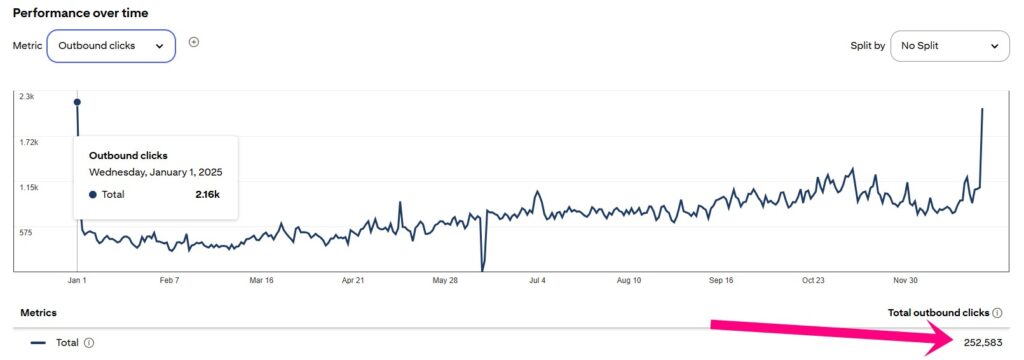
In 2025, I’ve got 252,583 blog visitors. And I’m going to share how, so let’s begin.
This post contains affiliate links (including Amazon Associate links). If you make a purchase through these links, I may earn a small commission at no extra cost to you. As an Amazon Associate, I earn from qualifying purchases. Please read full disclosure for more information. I also use AI to help me write, but I tell it exactly what to say based on my results and experiences.

Join other action takers and get the plan to see how these phases work together, so your hard work finally pays off.
1.) Why you should use Pinterest for business:
Reason #1: Most Pinterest users are buyers:
The first reason is that over 80% of Pinterest users are buyers.
You can reach a lot of people without struggling and wasting a ton of your time in front of your laptop.
And you also don’t need a huge following.
Recently, I saw someone with 0 followers and 1,5 million monthly impressions. They’ve been getting people to their blog, too.
Reason #2: You won’t waste too much time reaching more people:
To be honest with you, I spent at least 4 hours more in front of my laptop when I was using Facebook for business.
There is nothing wrong with Facebook (I still use it), but it’s a lot of work to create all that content daily.
After I started using Pinterest and it became my number one traffic source, I stopped being a Social Media slave.
With less work, I get a lot more visibility. And it’s not magic…anyone can do this.
Reason #3: Pinterest ads are way cheaper and more powerful:
Another reason you should use Pinterest for business is that you can use its ads.
You will invest way less money than with Facebook or Instagram ads.
2.) How to set up a Pinterest account for your business:
STEP #1:
You have two options here. If you already have a Pinterest personal profile, you can simply convert it to a business account.
OPTION 1: Convert a personal account to a business account:
- Log in to your Pinterest profile account
- Go to pinterest.com/business/convert/
- Fill out your business name and website, then select a business type
- Click Create account
OPTION 2: Create a new business account:
- If you have a personal account but don’t want to convert it, go to pinterest.com/logout to log out
- Go to pinterest.com/business/create/
- Fill out your email, password, and business name, then select a business type
- Click Create account
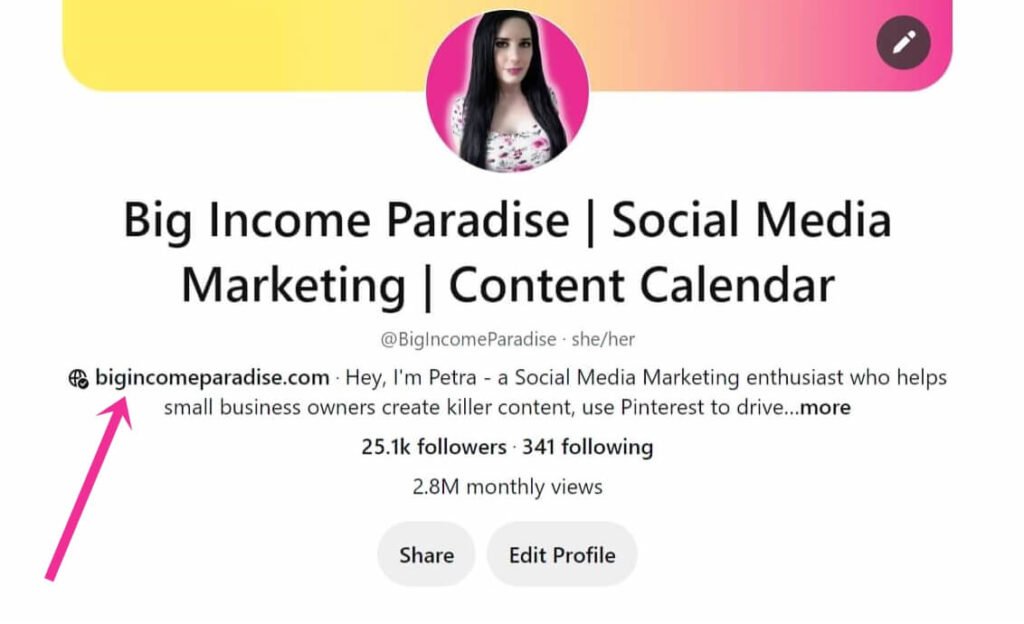
Click here if you want to check out the article from Pinterest. I included an example below of my business account.

STEP #2:
Complete your Pinterest for a business account:
- First, upload your headshot photo (smile in the photo)
- Choose your username (it should be the name of your brand or just your name if you are branding yourself) – Include some keywords (for example, Pinterest for Business Tips, Ideas for Weight Loss…)
- Complete your bio (include keywords – SEO optimized so that your business account will get ranked higher up and you will get in front of your targeted audience)
- Also, you can add your location
- And don’t forget to add your website (in the next steps, I will show you how to verify your website/blog)
If you want to speed up your keyword research, then you’ll want to read my other article about the best Pinterest Keyword Tool That Blew My Mind (And Why You’ll Love It Too).
STEP #3:
How to verify your website on Pinterest:
- Log in to Pinterest from a web browser and click the arrow in your top right corner to open your menu.
- Select Settings
- Click “Claim” and enter your website URL, then click Claim.
- Select “Add HTML tag”
- Then copy the tag and click Next
- Go to the index.html file of your website and add the tag to the <head> section before the <body> section
- Then go back to Pinterest and click Submit
You can also check out these steps in Pinterest’s blog post.
STEP #4:
Then you’ll set up your Pinterest boards and pins. You’ll have to include the keywords in titles and descriptions.
I use my Pinny SEO Pro to quickly create the pin text. But you can write everything manually if you wish.
I’ve also written a guide on how to optimize Pinterest to get more traffic.
3.) How to automate your Pinterest with their scheduler:
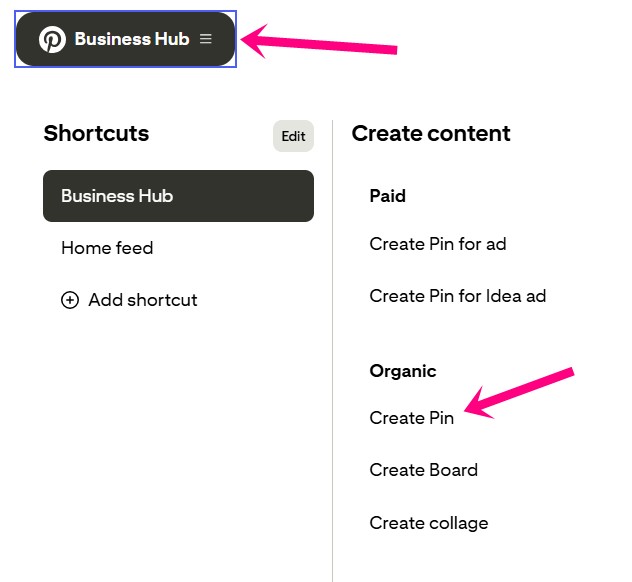
You can schedule your pins inside Pinterest. Click ‘Business Hub’ in the top left corner, then choose ‘Create Pin.’
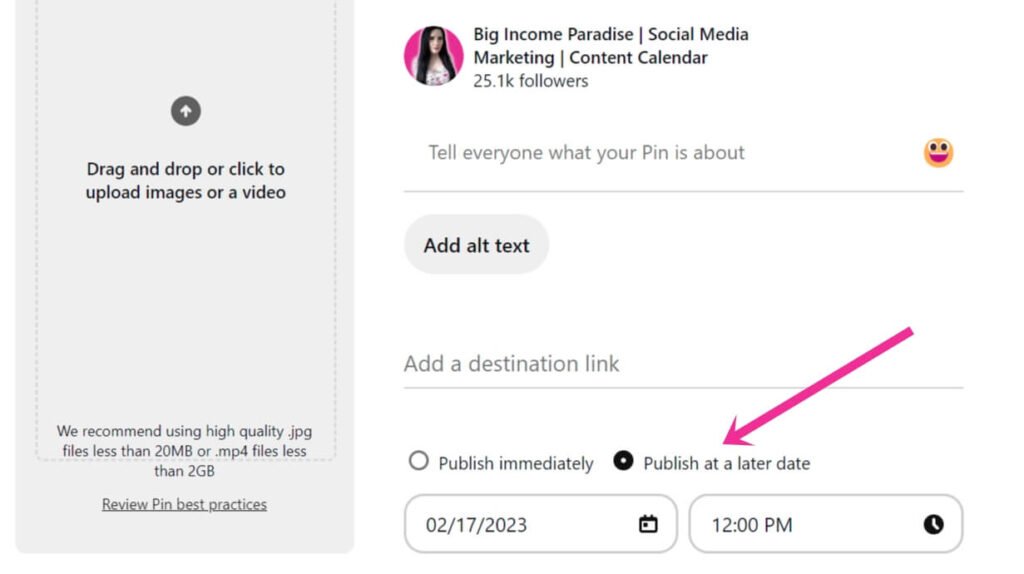
Next, you’ll upload your pin, fill out the title, description, alt text, add a link, and choose the most relevant board.
At the bottom, you will see two options:
- Publish immediately
- Publish at a later date
Click ‘Publish at a later date’ and choose the date and time when you want your pin to be published.
This helps you get traffic even while you sleep or have a family movie night.
The only limit that I don’t like with this Pinterest tool is that you can only schedule 100 pins.
4.) Create Pins for Pinterest:
Pinterest is a visual search engine, which means you have to create attractive pins.
But just making cute pins won’t cut it. I’ve learned that the hard way.
So first, the pin images have to be vertical (see my pin examples below):
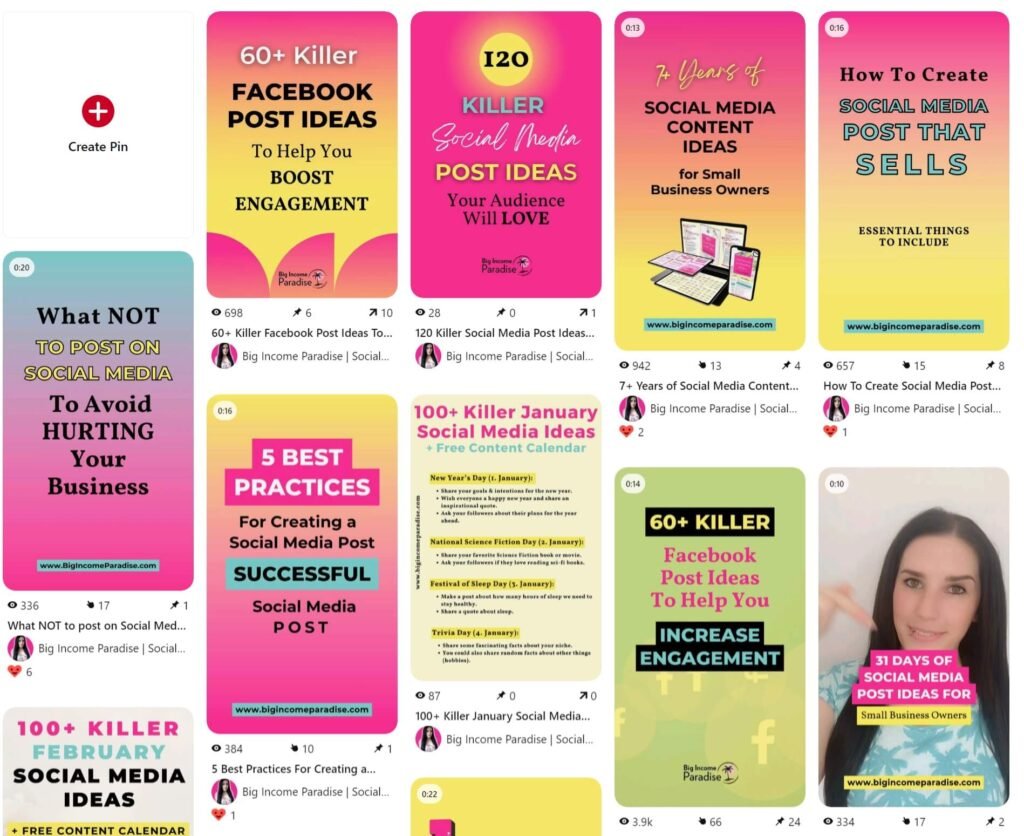
The ratio should be 2:3:
Width 1000 px 1080 px Height 1500 px 1920 px
Designing your pins will probably take you the longest. So you can do this work in Canva, or you could save up some time and use AI.
I use these 3 AI Tools to Create Stunning Pinterest Pins in Seconds. They save me so much time that I rarely use Canva.
I’m not against AI because it helped me grow my business faster than ever. But I know some people don’t like AI, so it’s okay if you don’t use it.
5.) How to grow your Pinterest account:
The number of followers is not that important anymore. I’ve recently seen an account that got 0 followers, 1,5 million monthly impressions, and probably a good amount of traffic.
But you can still try to get people to follow you. Here’s how:
- At the end of each blog post, ask people to follow you on Pinterest (I’ll do it right here – Click Here and follow me on Pinterest 😉)
- When sending an email to your audience, include a call to action to follow you on Pinterest
- Add a pin widget to your blog
- Add a Pinterest share button to your blog
- When making a video, you can include a call to action at the end
6.) Know your target audience:
You have to know who your target audience is.
Sorry to burst your bubble, but not everyone is interested in what you have. So if you don’t want to waste your time, you have to figure out who they are, what their pain points are, and more.
Here are the top 7 questions every small business owner should ask themselves to get to know their target audience:
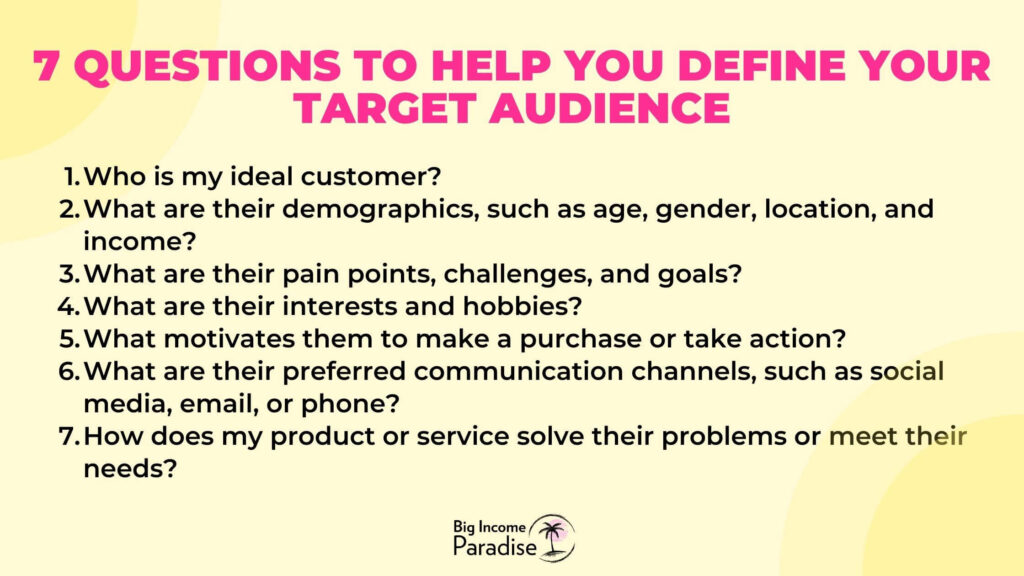
You can create detailed customer personas and tailor your marketing efforts to your target audience by answering these questions.
This can help you better connect with your potential customers, create targeted content, and ultimately grow your business.
7.) Check your analytics:
And here we go with the boring part – at least it used to be boring to me 😅
Years ago, I made the biggest Pinterest mistake on the planet – NOT CHECKING THE ANALYTICS.
I wasted a ton of time doing things that didn’t work at all. So don’t repeat my mistake.
If you want to use Pinterest for business, then analyze how your pins are doing and see what’s working.
You can find the analytics by clicking the “Business Hub” at the top left corner. Then choose “Analytics overview.”
Go through it and get familiar with what each thing means. But don’t focus on Impressions. Your goal should be to boost outbound clicks.

PINTEREST COURSE I RECOMMEND:
The Ultimate PinProfits – my course goes in-depth into showing you how to gain traffic from Pinterest and make a full-time income from this amazing platform.
The Secret Recipe To Pinterest Traffic – this is an eBook that will give you a proven roadmap to drive consistent, high-quality traffic to your website, blog, or business.
CONCLUSION:
Now you see why you should be using Pinterest for business. I find it way easier to get more visibility, grow my email list, and make sales. I’m sure it will help you too.
When you do Pinterest marketing the right way, you will reap the rewards faster and for many years.
Every blogger and small business owner who learned to market on this platform is saying that it’s their main source of traffic and income.
Now take action and implement the tips I’ve shared with you.


 Petra is a full-time blogger and CEO of Big Income Paradise. She teaches digital creators how to get more Pinterest traffic, generate leads, create better content & digital products, and make money online with the help of AI.

Loads of amazing tips in here. Following as well!
Thank you for your feedback =) I’m happy you loved the tips. Let me know if there is anything else I can help you with.
It’s interesting. Bookmarked. will try to implement the tips.
Hey Mittali. Yes, try them out and let me know when you get results 🙂
I just recently started using Pinterest for my business, so your advice is greatly appreciated!
Hey Kimberlie 🙂 I’m so glad the tips helped you.
Thank you so very much for sharing your information, I appreciate greatly and look forward to seeing more blogs from you
Thank you Anne! I’m glad you loved my blog post. There is at least one blog post per week so stay tuned 🙂
An excellent guide that is a huge time-saver for anyone new to Pinterest. I wish I had this post when I was starting with Pinterest!
Hi Chris! Thank you 🙂 I’m glad you got value out of it.
I’m a little intimidated by the analytics piece, but excited to try and understand and then tweak to help with growth! Thanks for the nudge about its importance!
Hey Kari. Checking the analytics is a must. Don’t be intimidated 🙂 It’s better to analyze your results than to blindly doing strategies that might not even work.
This is wonderful information. I have been advertising a few products lately on my Pinterest for other companies and have made some money doing that. Pinterest is just a far simpler and friendlier search engine than Google.
Thank you for sharing.
Pinning this also for future reference.
Hi Nyxie. I’m happy that you got lots of great information here. Yes, I totally agree – Pinterest is friendlier search engine 😉
i’ve been trying Pinterest for a few months now and starting to figure it out a bit. lots of helpful tips here. thanks
Hey Eric! I’m glad you got a lot of value from my blog post. Pinterest can help you a lot in your business and you don’t need to figure it out on your own. I learned everything from THIS COURSE HERE, and I’m seeing great results.
A strong guide, pin validator is still wonky on my end but Pinterest is great!
Hi John. Really? It works for me. That’s strange – maybe contact Pinterest. They will definitely help you.
Thank you for the great post, good info on how to use Pinterest to get a larger following. I have noticed several bloggers mentioning Tailwind, so I will be giving it a try! I look forward to more posts!
Hey Denise! Yes Tailwind is definitely a MUST when you’re doing Pinterest marketing. You get lots of benefits from it.
Very useful, thank you so much!
Hey Amy. My pleasure 🙂
This is so helpful! I will need to get on making some rich pins for myself.
Hey Campbell. Yes, you should have rich pins. This will help you a lot.
Great tips! I love tailwind and your advice about still manually pinning is spot on. Thanks!
Hey Jamie. I’m happy to hear you love my advice 🙂
These are great tips for using Pinterest to grow our business and blog! Thank you for sharing this!
Hey there Elizabeth 🙂 I’m happy to hear you loved the tips in my blog post 🙂 Thank you for your feedback
Great tips. I’ve recently set up Pinterest to drive traffic to my blog and I’m quickly realizing how much I have to learn! It’s a bit scary trying to master everything!
Hey Jo! You can master Pinterest fast. It’s not that hard. I learned from a specific course in a week or so. The most important part that is actually the hardest is staying consistent 🙂
This is such a helpful post! I’m still new to blogging and all I’ve been hearing about so far is how Pinterest is pertinent to bringing traffic to your blog! I’m gonna check out the link you shared because I’m super eager to learn more 🙂
Hey Huda 🙂 I’m so happy you find this post helpful. Yeah, keep on learning and you will see even better results. And if you have any questions, don’t hesitate to reach out to me and ask 🙂
These are great tips! Especially the one about still needing to manually pin even if u do have tailwind. I had no idea. Thanks for the tips!
Hey Urwah. I have to say that some other bloggers say that you don’t need to pin manually. But I guess it depends. If I schedule all my pins, my engagement goes down. So that’s why I mention this in the blog post. We should all test it out and see what works for us 🙂
Very useful post. I didn’t know about the manually pinning. I just do it because it’s fun but now I’m really happy that I do. Thanks for the insight.
Hey Pernille 🙂 I hear that you don’t need to manually pin, but I saw my engagement and reach went down when I just scheduled everything through Tailwind. So maybe some people can schedule everything, but some can’t. Maybe it depends on how long have you been using Pinterest. We have to test it out and see for ourselves 🙂
I have been using Pinterest for just fun but this article helped me to get more insight about using Pinterest professional.
Hey Priya. Pinterest is really powerful for our business. It can really help you grow 🙂
Wonderful post! Lots of great tips.
Hey Janja! I’m glad you love my post 🙂
I am pretty new to Pinterest. Do you message the ones you follow? Do you reach out to them or just save their shares to your boards?
Hey Ron, that’s a good question. No, I don’t reach out to them. I re-pin their pins, some of them re-pin my pins and that’s it. But you can try reaching out to people and let them know you love their blog posts and pins. Some will respond, some won’t. But your focus should be on Pinterest Marketing. You can learn the whole strategy from Pinterest Ninja (here). And let me know if you have any other questions.
Nice information, Thanks for sharing, appreciate your help
I’m happy to hear my blog post was helpful 🙂
I am really thankful you shared such important information.
Hey Sahil, I’m glad you got so much value from my blog post 🙂
I love your post, very usefull tips
I implementing to mu blog and my blog star slowly growing up
Thanks for sharing 🙂
Hey Irwan, I’m glad you’re seeing results. Keep going! 😊