
I’ve been thinking about my Pinterest marketing strategy a lot because so many creators are getting zero clicks.
They write great content, but nobody shows up to read it.
It is because they treat Pinterest like Instagram. But it doesn’t work like that.
Pinterest is actually a visual search engine. People use it to find cool ideas and solutions.
If you want a lot of Pinterest traffic that helps your business grow, you just need a simple plan. Let me show you how it works.

This post contains affiliate links (including Amazon Associate links). If you make a purchase through these links, I may earn a small commission at no extra cost to you. As an Amazon Associate, I earn from qualifying purchases. Please read full disclosure for more information. I also use AI to help me write, but I tell it exactly what to say based on my results and experiences.
Join other action takers and get the plan to see how these phases work together, so your hard work finally pays off.
Why You Need a Real Pinterest Marketing Strategy
You need a real Pinterest strategy because it stops you from wasting hours on content that won’t get you clicks.
A real system builds a steady stream of passive income that protects your business when other social apps decide to make you invisible.
I see creators playing Russian roulette with their traffic every single day. They create a pretty graphic, pick a random title, and pray that someone finds it.
That’s NOT a business plan. It is just a hobby that’ll exhaust you.
I used to grow my business using Facebook and Instagram. But I felt tired because my posts got no visibility after 24 hours.
My blog traffic was climbing up as slowly as a sloth on vacation.
Then I heard creators were using Pinterest for business because Pins can drive traffic for months. So I committed to it.
The traffic didn’t come that fast, but I knew it was a long-term game. My first month only brought 10 people to my blog.
After 6 months, I finally saw about 1,000 visitors per month.
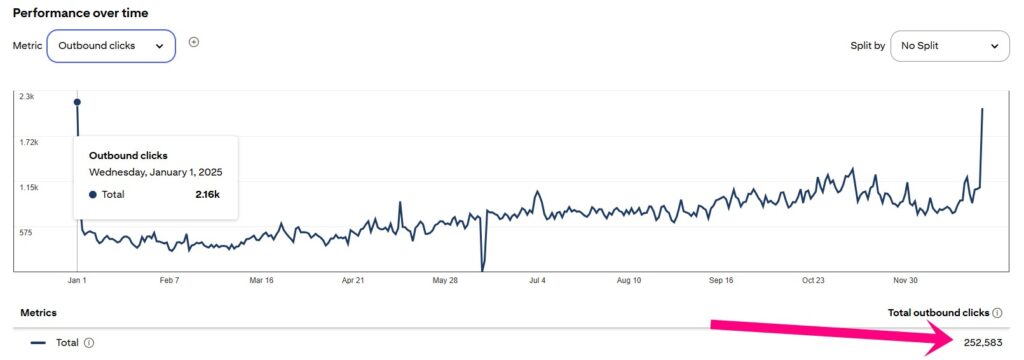
I consistently pinned, and in 2025, my traffic grew to 252,583 visitors.
You don’t need to be a marketing genius to make this work. You just need to stop doing random tasks and let a real engine do the heavy lifting for you.
The R.I.C.H. System Broken Down
The R.I.C.H. system is a 4-step plan that helps you:
- optimize your Pinterest profile,
- find the right keywords,
- create high-converting fresh pins on Pinterest,
- and gets you the outbound clicks.
It’s the exact setup I use to turn random views into actual sales without working all day long.
Because if you’re not getting enough traffic, you won’t boost your income. But this system will stop that from happening.
Let’s look at how these pieces fit together, so you can use them today.
R – Revenue Setup
You need a Pinterest business account because it shows you which pins are getting clicks and saves.
That matters a lot. If you don’t know what’s working, you keep creating content that nobody clicks on. You waste time and get zero results.
Plus, setting up the business account up is free and takes 5 minutes.
Once you have it, go straight to your Pinterest profile bio. Write exactly who you help and what they’ll get from you.
Your name field is searchable, too. Add a keyword after your name so people can actually find you. Something like “Your Name | Pinterest Traffic Tips” works well.
Next, link your website and verify it. Pinterest trusts verified accounts more.
Now, if writing your bio, board titles, and board descriptions from scratch sounds like a headache, I get it.
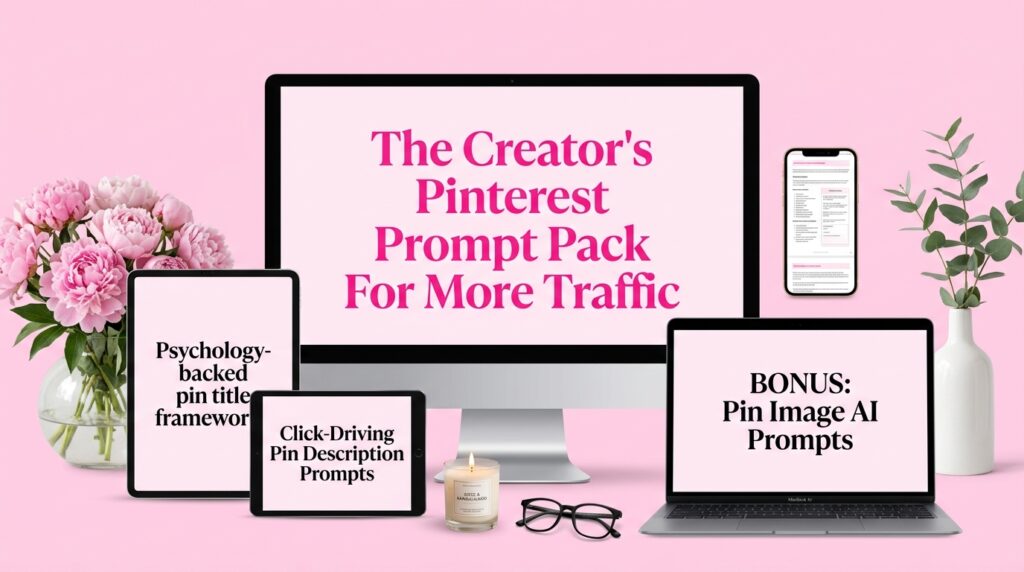
I rewrote my bio 6 times before it finally felt right. That’s exactly why I built The Creator’s Pinterest Prompt Pack.
It has 30+ AI prompts that cover your entire Pinterest content workflow. Your bio, board titles, board descriptions, pin titles, pin descriptions, content ideas, and AI image prompts for your graphics.
All pre-written with Pinterest SEO rules already baked in, so you’re not guessing at character limits or keyword placement. You just fill in your niche and paste it into any AI tool you already use.
That’s your foundation. Get this right before you create a single pin.
I – Indexing (SEO)
Pinterest SEO works the same way Google does. You type something in the search bar, and Pinterest shows you relevant results.
Your job is to use the same keywords your audience is already typing.
The free way to do keyword research is to type your topic into the Pinterest search bar and see what pops up underneath. Those suggestions are real searches from people.
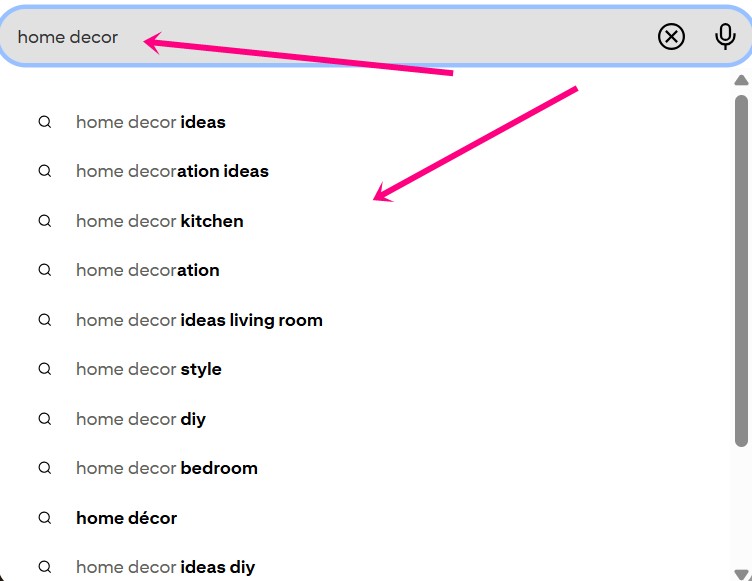
Use those exact phrases in your board titles, your pin descriptions, your profile bio, etc.
A big mistake I’ve noticed some creators make is that they write poetic pin descriptions. “A cozy routine for the soul.” Well, that sounds nice, but nobody’s searching for that.
Write what your reader would actually type at 11 pm when they’re trying to solve a problem.
Now, I personally use Pin Inspector to speed this up. It pulls keyword data straight from Pinterest and shows you the monthly search volume for each term. Pinterest won’t show you that in the search bar.
So instead of guessing which keywords are worth your time, you can see exactly which ones people are actually searching for. That means you stop wasting weeks on content nobody looks for.
It’s a one-time payment too, so no annoying monthly fees yaaay 😆
Once you have your keywords, the placement is simple. Put your main keyword in your:
- board title and description,
- in your pin description and title,
- and your title overlay on the image.
That’s how Pinterest figures out who to show your content to. Simple, isn’t it?
C – Content Creation
You don’t need to write a new blog post or lead magnet every day to keep Pinterest happy. You just need to create fresh pins on Pinterest that link to your existing content.
Pinterest doesn’t care if the post is new. It cares if the pin is new.
So take a blog post, lead magnet, or even a social post, and make 3-5 different graphics for it. Different images, different titles, different colors. That counts as a fresh Pinterest post every single time.
I do this every week. I pick a few older blog posts that already get traffic, make new graphics for them, and schedule them out. This takes me maybe 2 hours per week.
The creators who burn out are the ones who think they need to write something new every single day. You don’t. You just need to keep feeding the algorithm something it hasn’t seen before.
And the easiest way to do that is to recycle what’s already working and just give it a fresh look.
H – Hook the Click
You get outbound clicks when your pin title makes someone feel like they’ll miss something important if they don’t tap it.
Most creators focus on making their pins pretty. But pretty doesn’t pay bills. A clear, specific title that speaks to a real problem does.
Think about what your reader is struggling with right now. Then write your pin title like you’re handing them the answer on a silver plate.
For example: “How I got 252,583 blog visitors from Pinterest without a team” gets more clicks than “Pinterest tips for bloggers.”
One feels like a secret. The other feels like homework, doesn’t it?
Your image matters too. Use a clear font, high contrast colors, and make sure the text is readable on a small screen. Remember, most people are scrolling on their phones, not a laptop.
And always, always, ALWAYS link your pin straight to the thing that helps them. Your blog post, your lead magnet, your low-ticket offer. Don’t make them hunt for it because they won’t.
But the click is just the beginning. Where you send them next is what grows your business and makes you sales.
So send people to your:
- blog posts (with lead magnet, low ticket offer, affiliate products)
- lead magnets
- your low ticket offers
- or even YouTube videos, or social media posts
Now, if writing pin titles still feels like pulling teeth, I get it. I used to spend 15 minutes on one title and still wasn’t sure it would get clicks.
That’s why I built The Creator’s Pinterest Prompt Pack. It covers your entire Pinterest content workflow.
From pin titles using 11 different psychology frameworks, pin descriptions for every content type you’re already promoting, board titles, board descriptions, profile bio, content ideas, and AI image prompts for your graphics.
All pre-written with Pinterest SEO rules and marketing psychology already baked in. You fill in your niche, paste it into any AI tool you already use, and get a month of Pinterest content done in one afternoon.
Stop Playing the Guessing Game with Your Data
Checking your Pinterest analytics every day is a waste of time, and I’ll tell you why.
Pinterest is a slow burn. A pin you created today might not get traction for 3 to 6 months.
So if you check your stats on Monday and nothing looks great, you’ll panic and start changing the strategy. Then you’ll never know what actually worked.
I check my analytics once a week. That’s it.
I look at which pins got the most clicks, which topics are bringing people to my blog, and which boards are performing best. Then I make more content around what’s already working.
That’s the whole system. No 3-hour rabbit holes into data that won’t mean anything for another month.
Now let’s talk about what numbers you should focus on. You should check the outbound clicks, not impressions.
Impressions just mean people saw your pin while scrolling. Clicks mean they cared enough to visit your site. Those are the people who might join your email list or buy something.
So check your numbers weekly, not daily. Stay consistent with what’s working, and cut what’s not getting clicks after a few months.
That’s how you stop guessing and start growing.
Final thoughts: Time to Turn Your Traffic into Income
A solid Pinterest marketing strategy has nothing to do with having the prettiest pins on the platform.
It’s about being helpful to the right people and showing up consistently with content they’re already searching for.
The R.I.C.H. system gives you all 4 pieces. Set up your profile, find your keywords, create fresh pins, and write titles that make people click.
And if you want to do all 4 steps faster, The Creator’s Pinterest Prompt Pack gives you every prompt you need for the whole workflow.
Creators who used to spend 30 minutes writing one pin title now get 10 solid options in 2 minutes. That’s the difference between Pinterest feeling like a second job and Pinterest actually working while you sleep.
So take action with the prompt pack now, because the sooner you start, the sooner you’ll wake up to visitors and customers who found you while you were sleeping. Isn’t that the whole point? 😉

 Petra is a full-time blogger and CEO of Big Income Paradise. She teaches digital creators how to get more Pinterest traffic, generate leads, create better content & digital products, and make money online with the help of AI.
